SendMyAvailability turns your real calendar availability into polished, personalized outreach — so prospects can book without the back-and-forth or the awkward generic scheduling link.
Connects Google, Outlook & Apple Calendar in minutes
You send an email. They ask when you're free. You list times. None work. Three days and six replies later, the momentum is gone — and so is the meeting.
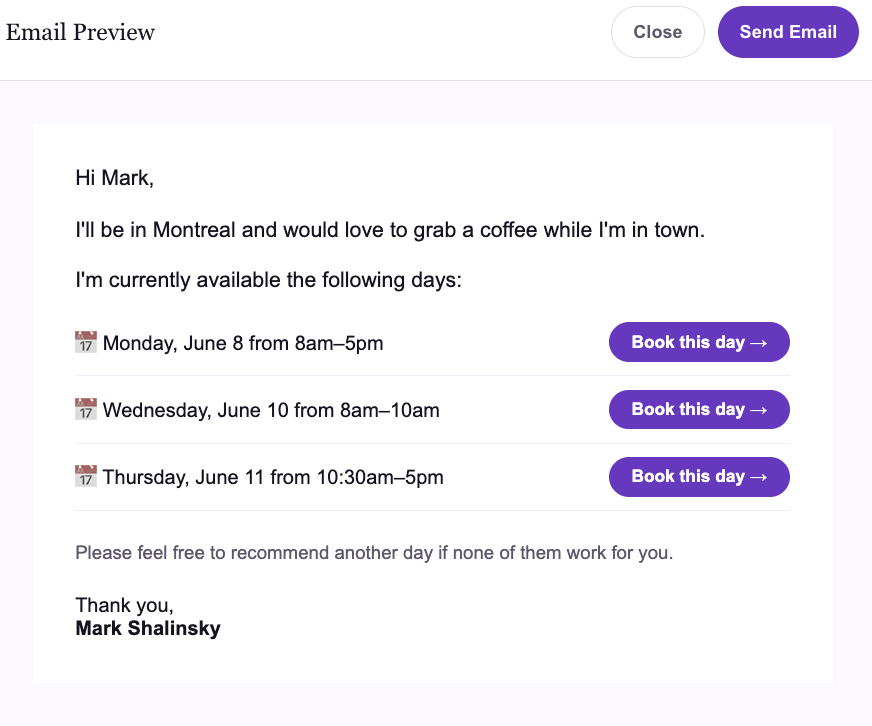
Your real open times, pulled straight from your calendar, with a Book this time → button next to each. No guessing, no reply chain, no friction — they click, choose, done.
See the example emailReal time options, written in your voice, with one-click booking on every line. It reads like a thoughtful note, not an automated scheduler.
Hi Sarah,
I'd love to find 20 minutes next week. Here are a few times that work on my end:
Happy to work around your calendar as well — just say the word.
Every button reads your live calendar and protects against double-booking.
Link Google, Outlook, Apple, or any ICS calendar in a couple of clicks — we read it live so the times you offer are always real.
Call, Zoom, coffee, lunch, an intro, a follow-up, or a demo. The opener is written to match.
We find your real open times and write a personalized email you send from your own Gmail or Outlook.
They pick a time that suits them and your calendar updates automatically. No reply chain required.
A basic booking tool is great when someone already wants to meet — they open your link and dig through a calendar. SendMyAvailability is built for outbound, when you're the one trying to make the meeting happen.
Built for inbound, when they come to you
Built for outbound, when you reach out first
Turn replies into booked calls faster with personalized time options right in the thread.
Send polished availability without pushing people to a generic booking link.
Offer candidate-friendly time slots directly inside the email, ready to book.
Make outreach feel personal while still running on live calendar availability.
Manage multiple calendars, signatures, and clients from one workflow.
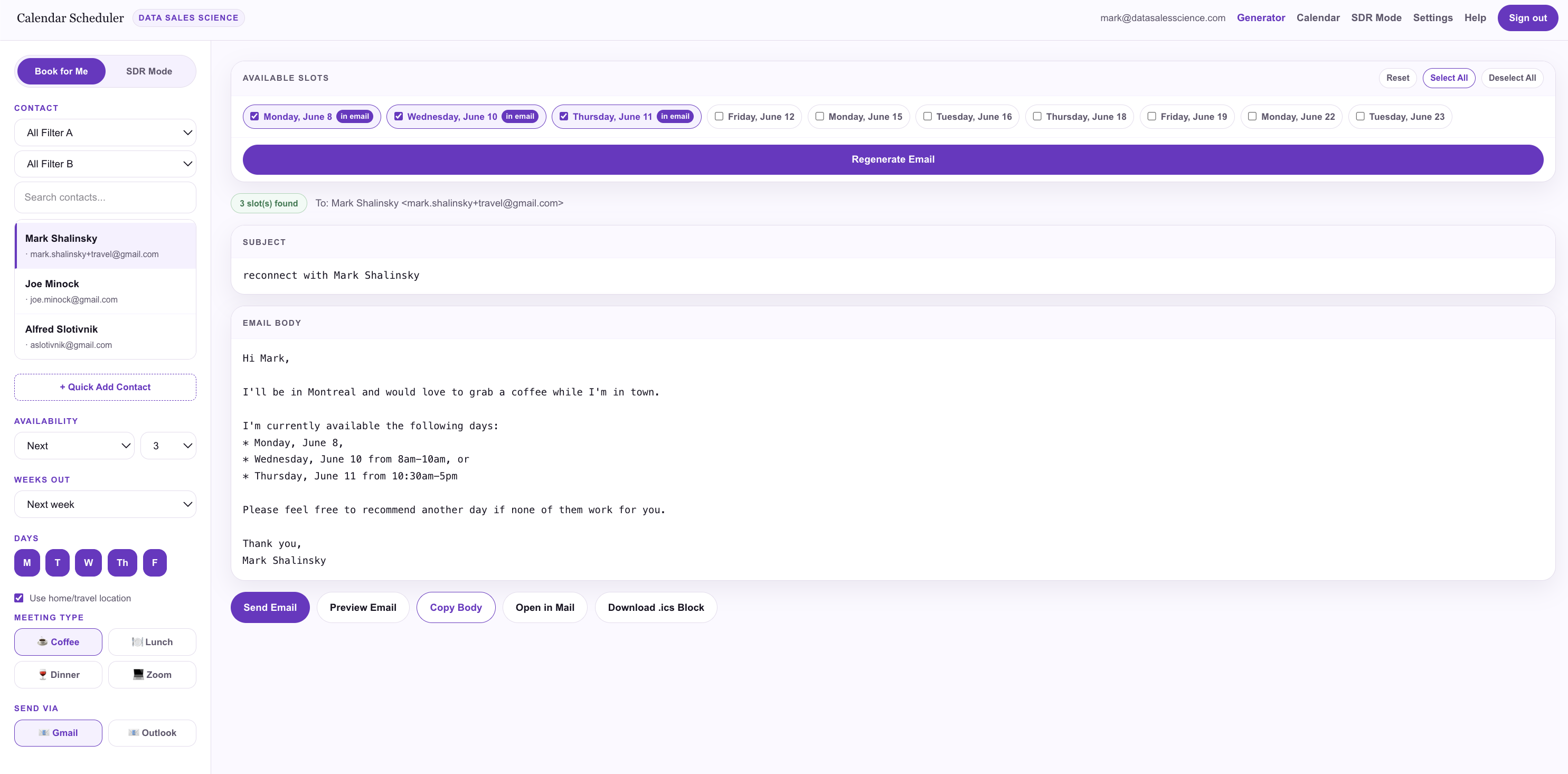
Select a contact, choose a meeting type, and we read your live calendar to build a personal email with per-time booking buttons.
Recipients only see the window you offered — say "Wed 8–10am" and that's all they get, with a link to your full calendar.
Heading to a city where you have contacts? The opener automatically offers to grab coffee while you're in town.
Book meetings on behalf of multiple clients — each with their own calendar, contacts, booking page, and signature.
Emails come from you, your real address — not a no-reply scheduling bot. Connect once via OAuth.
See a prospect on LinkedIn, click the extension, and your availability drops straight into the DM composer.
Free tools and booking links are great for simple scheduling. But when you're reaching out to a prospect, client, candidate, or decision-maker, a generic link can feel impersonal.
InboundFree calendar tools |
InboundA basic booking link |
OutboundSendMyAvailability |
|
|---|---|---|---|
| Booking page | Yes | Yes | Yes |
| Live calendar availability | Yes | Yes | Yes |
| Personalized availability inside the email | Limited | Limited | Yes |
| Built for outbound outreach | — | Partly | Yes |
| Send from your own Gmail / Outlook | Limited | Partly | Yes |
| Time-constrained booking windows | Limited | Partly | Yes |
| SDR / client mode | — | Team setup | Yes |
| Travel-aware outreach | — | — | Yes |
| Designed to avoid the generic-link feel | — | — | Yes |
Keep your booking link for inbound. Use SendMyAvailability where it feels too generic.
"I'm in Chicago next week — want to grab coffee Tuesday or Wednesday?"
"Here are three windows that work on my end — grab whichever suits you."
"One login, every exec's calendar, signature, and availability — kept separate."
We're early — and building with the salespeople, consultants, recruiters, advisors, and operators who live in email every day.
Start with personalized availability for $9/month. Upgrade when you need more calendars, contacts, automation, or team workflows.
For individuals and power users sending personalized availability.
For salespeople and SDRs booking on behalf of clients.
For agencies and teams managing many calendars and signatures.
"We built SendMyAvailability because 'here's my link' works for inbound scheduling, but not always for relationship-driven outreach. When you're asking someone for time, the way you offer availability matters."
Mark Shalinsky, PhDFounder, Data Sales Science
SendMyAvailability uses secure calendar connections to read your availability and prevent double-booking. We don't sell your calendar, contact, or email data — full stop.
No. A basic booking link is great for inbound — you share it and wait for someone to open it. SendMyAvailability is built for outbound emails where you want to offer personal, specific availability and make it easy to say yes. You make the first move and remove the friction that loses the meeting.
Yes. SendMyAvailability connects to Google, Outlook, Apple, and any ICS calendar. Connect as many as you want — we check all of them so you're never double-booked.
Yes. Every time option reads your live calendar availability, so the slots you offer are always real and conflicts are protected against automatically.
Yes. Connect your Gmail or Outlook via OAuth and availability sends from your own address — so it lands like a normal personal note, not a no-reply scheduling bot.
Salespeople, consultants, recruiters, advisors, legal / finance / insurance BD teams, SDRs, executive assistants, and anyone managing meetings on behalf of others.
No. Many people keep a booking link for inbound scheduling and use SendMyAvailability for outbound outreach — the two work side by side.
Free calendar tools are great for basic scheduling. SendMyAvailability is built for personalized outreach, where the goal isn't just to schedule a meeting — it's to get the meeting in the first place.
Stop typing out times in every email. Connect your calendar and send your first one-click availability email today.
Works with Google, Outlook & Apple Calendar